Google Finance App Returns: Master AI-Powered Portfolios & Automated Market Tracking
Discover the newly launched standalone Google Finance Android app and web redesign. Learn how to track investments using AI-powered smart portfolios, document parsing, and automated market intelligence briefings.
Author
Shalimar Mehra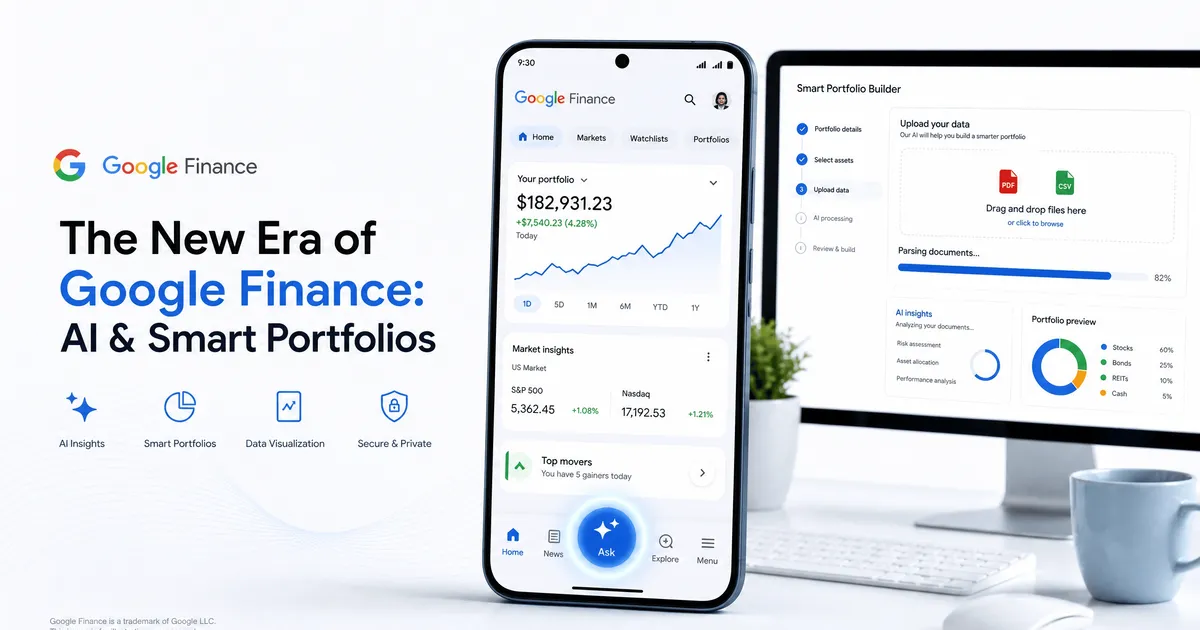
The New Era of Google Finance: AI, Smart Portfolios, and a Dedicated Mobile App
Managing a personal investment portfolio requires monitoring corporate earnings, shifting asset allocations, and tracking macroeconomic indicators. To reduce this friction, Google has officially brought its newly redesigned Google Finance web platform out of beta while launching a highly anticipated, standalone mobile application for Android.
The original Google Finance app was removed in 2015. Now, it returns with a heavy focus on artificial intelligence, agentic workflows, and seamless document parsing, placing it in direct competition with major consumer finance platforms like Yahoo Finance and trading apps like Robinhood.
The Return of the Dedicated Mobile App
For investors who check market movements multiple times a day, the new Google Finance Android app provides a centralized, native pocket viewport. An iOS version is actively in development and slated to launch later this year.
The app utilizes Google’s Material 3 Expressive design, featuring a prominent floating toolbar with an "Ask" button for immediate access to AI research tools. Right out of the box, the app offers several core functionalities:
Centralized Watchlists & Real-Time Data: Users have immediate access to live financial news feeds and real-time market data.
AI-Powered "Key Moments": Instead of manually searching for news to understand market volatility, the app uses AI to generate "Key Moments" that instantly explain exactly why a specific stock's price is moving.
Over the coming months, Google plans to integrate live earnings call streams directly into the mobile experience.
Amazon Prime day - Huge Discounts on iPhone 17 Series: Amazon Prime Day & Flipkart GOAT Sale 2026 Guide
Building Smart Portfolios with Document Parsing
The most significant upgrade to the web experience—which will soon migrate to the mobile app—is the overhauled portfolio builder. Historically, tracking holdings required manual entry of ticker symbols, historical trades, and purchase prices.
Google Finance now automates this process through document parsing. You can create a comprehensive dashboard by uploading PDFs, CSV spreadsheets, or even dropping in basic screenshots of your existing brokerage holdings. Alternatively, you can describe your assets directly to the built-in chatbot using natural language.
Once your portfolio is populated, the dashboard consolidates your investments to display performance data and actionable insights on asset allocation. You can then query the AI research tool as a personal consultant. Actionable prompt examples include:
"What sectors are currently underrepresented in my portfolio?"
"How does my fixed income allocation impact my long-term growth potential?"
Setting Up Automated Market Intelligence Tasks
To help users monitor volatile market shifts without constantly refreshing a browser window, Google Finance introduced an agentic component that runs custom, schedule-based briefings in the background.
You can set up custom tasks using natural-language prompts tied to your personal watchlist or specific market sectors. For example, you can instruct the system: "Send me a daily pre-market briefing analyzing significant overnight moves across major cryptocurrencies".
Once configured, Google Finance compiles this data and pushes a customized brief directly to your phone via native notifications on the Google app (for both Android and iOS), with alerts also appearing on the web research panel.
Navigating the Risks of AI in Finance
While these advanced AI tools streamline research, investors must exercise caution. Generative AI models and chatbots are known to hallucinate or misinterpret data.
Google includes explicit disclaimers on the platform, noting that "AI can make mistakes" and that all provided insights are strictly "for informational purposes only". The data is synthesized from third-party sources, meaning users should always independently verify financial data and consult with a licensed financial advisor before executing trades or making major investment decisions
Chcekout the Amazon Deal - Huge Discounts on iPhone 17 Series: Amazon Prime Day & Flipkart GOAT Sale 2026 Guide
Community Discussion
Loading comments...
Join the Conversation
Log in to post your thoughts, ask questions, and engage with authors and developers.
Log in to Comment