ChatGPT Health Integration: Securely Connect Your Medical Records
Learn how to securely connect Apple Health and medical records to ChatGPT. Discover new features, privacy controls, and how GPT-5.6 Sol improves health insights.
Author
Shalimar Mehra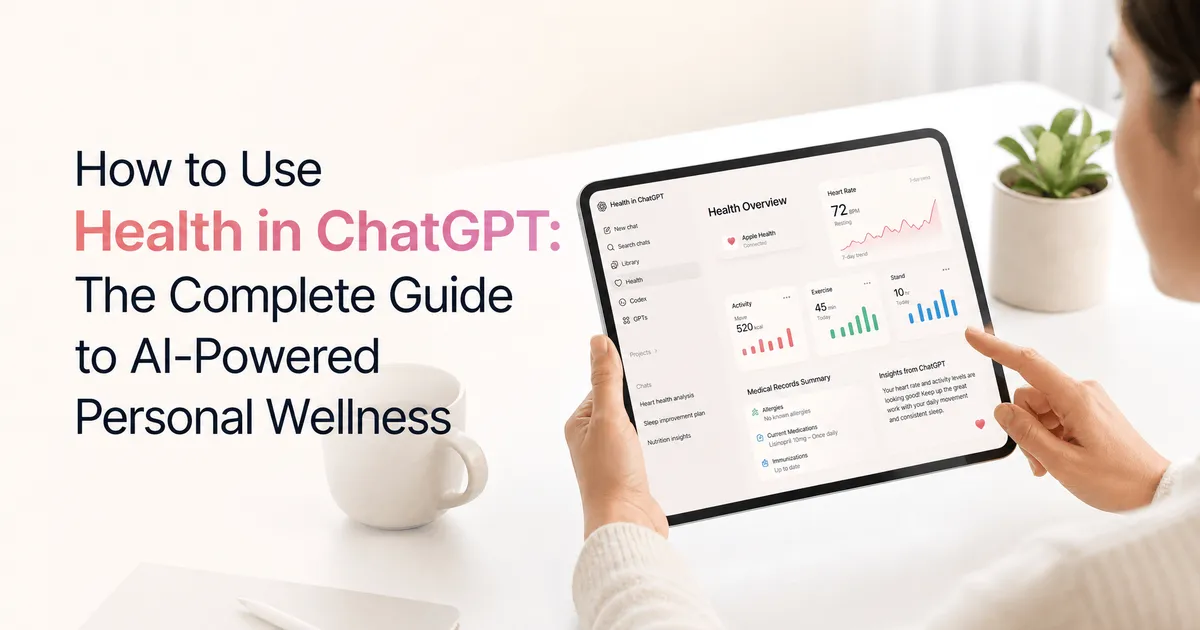
How to Use Health in ChatGPT: The Complete Guide to AI-Powered Personal Wellness
Every week, more than 300 million people turn to ChatGPT with health-related questions. From attempting to understand complex lab results to preparing for an upcoming doctor's appointment, users constantly seek AI assistance for their well-being. However, the critical context needed for these conversations is traditionally scattered across various patient portals, medical records, wearables, and apps.
To solve this, a dedicated Health experience in ChatGPT is rolling out to U.S. users, allowing individuals to securely connect their health data for highly personalized, context-aware conversations. This guide covers everything you need to know about the new ChatGPT Health features, the AI models powering it, and how to safely manage your data.
ChatGPT Health is a feature available to U.S. users aged 18 and older that allows you to securely connect data from Apple Health, supported U.S. hospital systems, One Medical, and Function Health. By linking this data, ChatGPT can contextualize your health history, summarize changes, and personalize everyday chats. The tool is powered by advanced models like GPT-5.5 Instant and GPT-5.6 Sol, and it features strict privacy controls: your connected health data is encrypted and is never used to train OpenAI's foundation models.
Before this integration, getting personalized health insights from AI required users to manually gather, upload, and explain their medical details repeatedly. By directly connecting to your health information, ChatGPT removes this friction. It empowers patients to quickly turn disconnected diagnoses and surgery notes into clear, understandable timelines, ultimately helping them ask better questions and advocate for themselves with medical professionals.
The AI Models Powering Health Conversations
OpenAI has implemented dedicated training to improve how ChatGPT handles health data. The models have been evaluated alongside hundreds of physicians using realistic health scenarios to ensure accuracy, safety, and appropriate escalation.
GPT-5.5 Instant: Available to free users, this model brings frontier health intelligence with meaningful improvements in recognizing when a user needs urgent care, asking for missing context, and explaining uncertainty.
GPT-5.6 Sol: Available to paid users (Plus, Pro, etc.), this is the strongest model for health tasks. It excels at reasoning across complex details, explaining visit notes in plain language, and analyzing how lab results change over time.
In clinical evaluations like HealthBench Professional, GPT-5.6 Sol consistently outperformed GPT-5.5 Instant across criteria such as completeness, clear communication, and helpfulness.
Privacy, Security, and Data Control
A common concern with AI and medical data is privacy. ChatGPT Health is built with strict, layered safeguards:
No Model Training: Connected medical records, Apple Health information, and any conversations utilizing that data are not used to train foundation models or target ads, regardless of your standard data settings.
Encryption: All data is encrypted at rest and in transit, with connected Health information receiving additional encryption protections.
Explicit Permissions: By default, ChatGPT will prompt you for permission before using your connected health data to personalize a response. You can approve these individually or change your settings to "always allow" via
Settings > Plugins > Health.
Step-by-Step Guide: How to Connect Your Health Information
Connecting your data is straightforward, though you can still ask general health questions without connecting any external accounts.
Access the Health Dashboard: Open the "Health" tab from the left sidebar or the "More" menu in ChatGPT and select "Get started".
Select Your Provider: Choose to connect Apple Health, supported U.S. hospital systems, One Medical, or Function Health. If you use a wearable device (like a fitness tracker) that syncs with Apple Health, ensure data sharing is enabled in that specific app so ChatGPT can access it.
Allow Data Sync: Wait a few minutes for your information to securely sync. You can connect multiple accounts during this time.
Review and Update: Once synced, review your listed conditions and medications. Manually remove outdated information (such as medications you no longer take) and add missing details, like family health history.
Start Chatting: Ask questions naturally in any chat. For a more direct prompt, type
@Healthin your message to explicitly instruct ChatGPT to pull from your health context.
Best Practices
Keep Your Context Updated: AI is only as good as the data it receives. Regularly update your health details within the ChatGPT Health sidebar to ensure conditions and medications are current.
Utilize the Sidebar: Treat the Health sidebar as your home base. Use it to view recent data trends, browse synced records, and find suggested prompts.
Verify Important Details: Always check crucial details against your original medical source. ChatGPT is meant to support, not replace, professional medical care.
Common Mistakes
Expecting Proprietary Scores to Transfer: If you use a third-party wearable app, be aware that some proprietary scores unique to that app may not transfer through Apple Health into ChatGPT.
Using a Separate Chat Unnecessarily: Early testers thought they had to visit a dedicated "Health" space to get insights. You can now ask health-related questions in any standard ChatGPT conversation, and it will draw on your connected data with your permission.
Forgetting Memory Settings: If you want to ask a sensitive health question without ChatGPT "remembering" it for future personalization, you must use Temporary Chat or manually turn off memory in
Settings > Memory.
Practical Examples
Integrated health data makes everyday AI interactions far more useful. Here are a few ways to use it:
Meal Planning: Ask ChatGPT for restaurant recommendations, and it can automatically factor in dietary restrictions or food allergies you have on file.
Activity Planning: If you have a recently recorded injury, ChatGPT can suggest lower-impact weekend activities suitable for your recovery.
Medical Translation: Turn scattered surgery notes and imaging results into a clear timeline written in plain English, which you can easily share with a physical therapist or personal trainer.
Expert Tips
Manage Third-Party Sharing carefully: ChatGPT has safeguards if you attempt to use third-party plugins with your health data (for example, sending a running routine to a friend based on your Apple Health stats). For sensitive actions, it will prompt you for explicit confirmation.
Total Disconnection: If you decide you no longer want your data in the system, navigate to
Health > Accountsto disconnect. OpenAI will delete data synced from that source within 30 days. Keep in mind that previously generated text within your chat history will remain until you manually delete those specific conversations.
Frequently Asked Questions
Who is eligible to use Health in ChatGPT? The feature is currently rolling out to logged-in ChatGPT users who are 18 and older in the United States. It is available across web and iOS on Free, Go, Plus, and Pro plans. It is not currently available in Codex.
Will my medical records be used to train ChatGPT? No. Connected medical records, Apple Health data, and the specific conversations that utilize them are strictly excluded from being used to train OpenAI’s foundation models or target advertisements.
Can ChatGPT replace my doctor? No. While models like GPT-5.6 Sol perform exceptionally well on medical evaluations, ChatGPT can still make mistakes. It is designed to help you understand your health and prepare for appointments, but it does not replace the care and judgment of qualified healthcare providers.
Key Takeaways
U.S. users (18+) can securely connect Apple Health and medical portals directly to ChatGPT.
Health data is encrypted and completely excluded from AI model training.
GPT-5.5 Instant (Free) and GPT-5.6 Sol (Paid) offer highly advanced reasoning for complex medical histories.
Users maintain full control, with the ability to approve data requests on a case-by-case basis and delete synced data at any time.
The tool supports medical understanding but should always be used alongside professional medical advice.
Conclusion
The integration of Health in ChatGPT represents a massive leap forward for personal wellness management. By allowing the AI to safely contextualize scattered medical data, users are empowered to advocate for themselves, understand complex medical jargon, and safely integrate lifestyle habits with their health goals. As long as users pair this powerful intelligence with the guidance of certified medical professionals, ChatGPT Health serves as an invaluable daily companion.
New Sign In Option - Google Selfie Sign-In: Secure Account Access via Video Verification
Community Discussion
Loading comments...
Join the Conversation
Log in to post your thoughts, ask questions, and engage with authors and developers.
Log in to Comment