Google Play Store Update: New Alerts for Removed & Dead Apps
Discover how the Google Play Store's upcoming feature will warn Android users about removed or dead apps to keep devices secure and free up storage space.
Author
Shalimar Mehra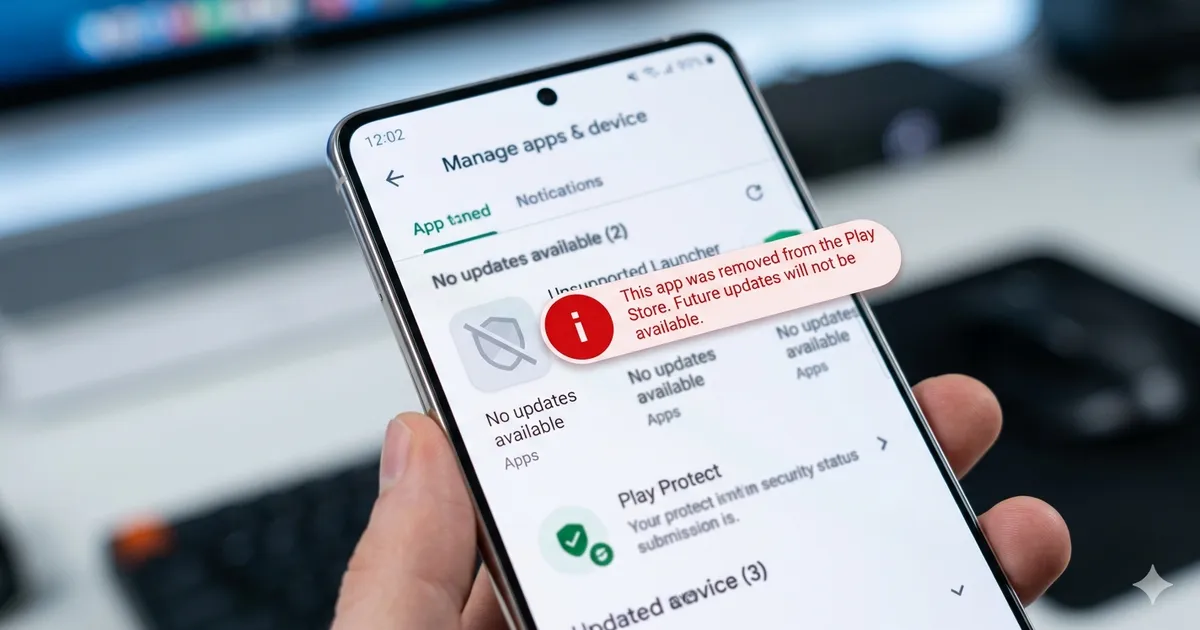
Google Play Store Could Soon Warn Users About Dead and Removed Apps
If you have used an Android phone for a while, you might have noticed that some installed apps can vanish from the storefront without a trace. Right now, there is no notification when an app is removed, leading users to discover the absence only when reading news reports, switching phones, or attempting to reinstall the software on a new device. That could soon change, as Google may begin alerting users when an installed app gets removed from the Play Store.
The Current Visibility Gap
Currently, the Google Play Store primarily notifies users about apps if there is a direct security concern.
Google Play Protect periodically scans Android devices for potentially harmful applications.
If a serious security violation or harmful behavior is detected, Play Protect sends an alert with a one-tap option to uninstall the app.
However, apps removed for routine reasons—such as a developer voluntarily withdrawing it, policy changes, or compliance updates—are delisted silently without any warning to existing users.
This silent removal process creates a visibility gap where the availability of an app changes without the user's knowledge.
What the Code Teardown Reveals
The upcoming changes were spotted during an APK teardown, which helps predict future service features based on work-in-progress code.
An Android Authority teardown of Google Play Store v51.4.19 uncovered strings of code indicating the store is developing a system to notify users about app removals.
These strings are designed to warn users that their removed apps will no longer receive future updates.
The warning text will automatically change depending on the number of apps removed, covering cases that involve multiple applications.
Why This Feature Matters for Android Users
Implementing this notification system will make the support situation and status of downloaded apps much clearer for the end user. Alerting users about "dead" apps prevents people from unknowingly depending on unsupported and potentially outdated software at inopportune times. Furthermore, knowing which apps are permanently cut off from updates will help users clear out useless applications and save valuable storage space on their devices.
Because this feature was discovered hidden in teardown code, there is currently no official confirmation or exact release timeline. It remains entirely possible that the warning system might undergo changes before launch, or it may not make it to a public release at all.
Must Read: Google Gemini’s 2026 Canva & Adobe Integrations: Redefining AI Design
Community Discussion
Loading comments...
Join the Conversation
Log in to post your thoughts, ask questions, and engage with authors and developers.
Log in to Comment